۱۴۴ بستهی npm متعلق به Mastra در یک حملهی ۸۸ دقیقهای به زنجیرهی تأمین به backdoor آلوده شدند
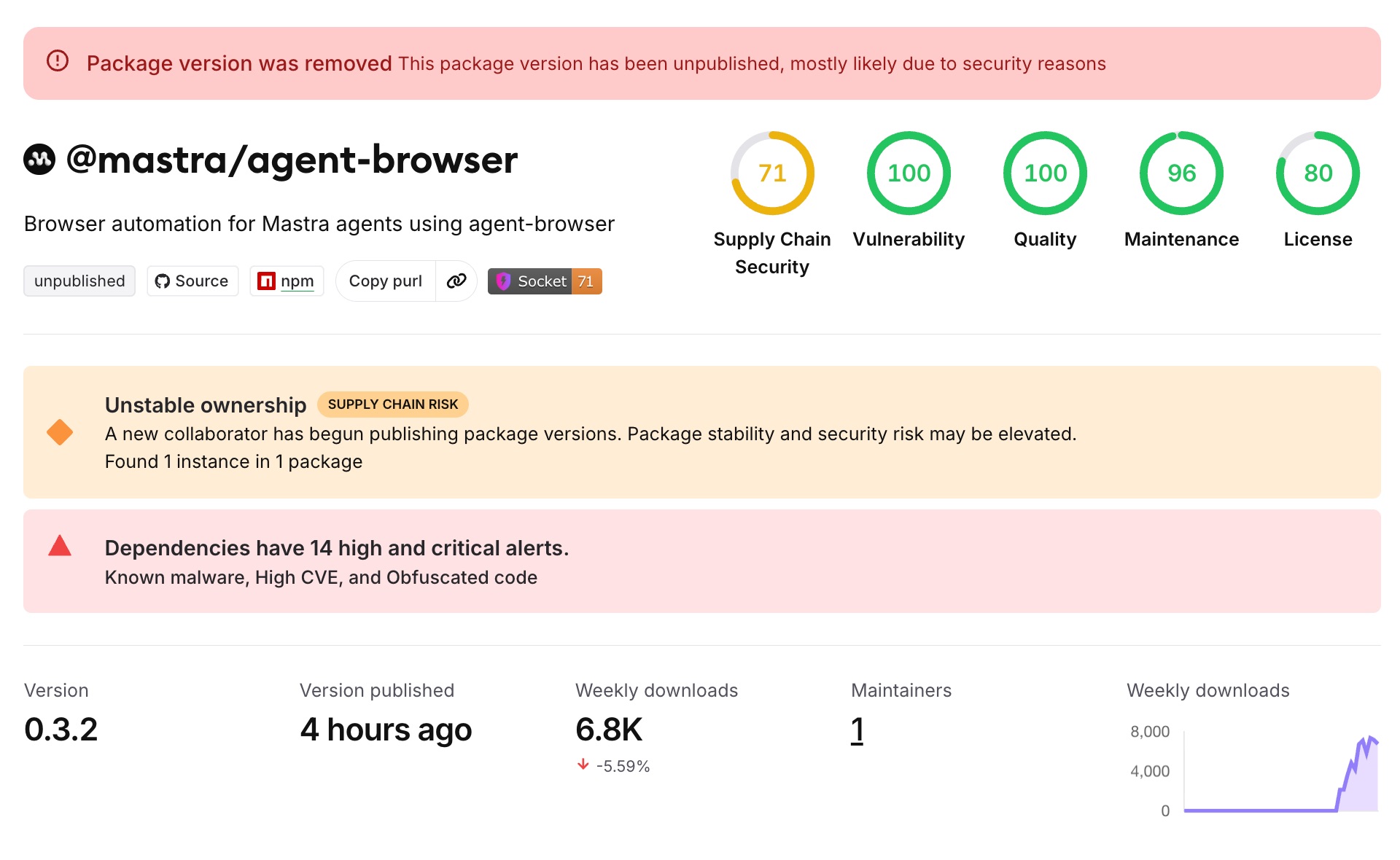
محققان امنیتی در Socket یک حمله زنجیره تأمین را افشا کردند که در تاریخ ۱۷ ژوئن ۲۰۲۶، ۱۴۴ بسته در فضای نام npm مربوط به @mastra را به مخاطره انداخت. مهاجم حساب کاربری یکی از مشارکتکنندگان دارای حقوق انتشار در چارچوب عامل AI به نام Mastra را در اختیار گرفت، سپس طی یک کمپین خودکار ۸۸ دقیقهای، هر بسته آسیبدیده را با یک وابستگی مخرب typosquatted که به عنوان یک الزام محیط تولیدی تزریق شده بود، مجدداً منتشر کرد. بر اساس تحلیل Socket، هر توسعهدهنده، اجراکننده CI/CD، یا سیستم ساختی که پس از ۱۶ ژوئن یک بسته @mastra/* را نصب کرده است، باید آن محیط را به عنوان محیطی که احتمالاً به مخاطره افتاده است تلقی کند.
Mastra یک چارچوب TypeScript برای ساخت عوامل AI است و بسته اصلی آن (@mastra/core) بیش از ۹۱۸,۰۰۰ بار در هفته دانلود میشود. گستره این حمله — ۱۴۴ بسته در سراسر فضای نام، نه صرفاً یک هدف واحد با ارزش بالا — به این معناست که توسعهدهندگانی که در بازه زمانی حمله هر بخشی از اکوسیستم Mastra را نصب کردهاند، در معرض خطر بودهاند.
نحوه عملکرد حمله
مهاجم کد Mastra را مستقیماً تغییر نداد. در عوض، آنها یک وابستگی به نام easy-day-js به هر بستهی منتشرشدهی مجدد افزودند. این نام یک تایپواسکوات عمدی از کتابخانهی تاریخ dayjs که بهطور گستردهای مورد استفاده قرار میگیرد، میباشد — به اندازهای مشابه که اسکن خودکار وابستگیها ممکن است از آن غافل شود.
بستهی مخرب easy-day-js حاوی یک هوک postinstall بود — اسکریپتی که npm آن را بهصورت خودکار در طول npm install اجرا میکند، پیش از آنکه توسعهدهندهای هر کدی از بسته را وارد کند یا اجرا نماید. آن هوک یک بار دادهی دو مرحلهای را دانلود و اجرا کرد:
- مرحلهی اول (setup.cjs): یک بارگذار مبهمسازیشده که تأیید گواهی TLS را غیرفعال کرد، به زیرساخت مهاجم در آدرس
23.254.164[.]92:8000متصل شد، بار دادهی مرحلهی دوم را دانلود کرد، آن را بهعنوان یک فرآیند پسزمینهی جداگانه راهاندازی نمود، و سپس برای محو ردپا، خود را حذف کرد. - مرحله ۲ (protocal.cjs): یک سارق اطلاعات چندسکویی با حجم تقریبی ۴۱ کیلوبایت، مجهز به سازوکارهای ماندگاری برای Windows (کلید رجیستری Run)، macOS (LaunchAgent) و Linux (واحد systemd). این ایمپلنت ۱۶۶ افزونه مرورگر کیف پول ارز دیجیتال را فهرستبرداری کرد، تاریخچه مرورگر Chrome، Edge و Brave را استخراج نمود و یک کانال فرماندهی و کنترل با قابلیت اجرای کدهای دلخواه تکمیلی برقرار ساخت.
بازه زمانی حمله از ساعت ۰۱:۱۲ تا ۰۲:۳۹ UTC در ۱۷ ژوئن ادامه داشت. گزارشهای ممیزی npm نشان میدهد که یک حساب کاربری واحد — ehindero، مشارکتکنندهای که دسترسی انتشار وی به محدوده @mastra هرگز لغو نشده بود — تمام ۱۴۲ نسخه بسته مخرب را در طول همان ۸۸ دقیقه منتشر کرد. تیم امنیتی Microsoft نیز طبق گزارشهای تکمیلی، این حمله را شناسایی و اعلام کرد.
چه کسانی در معرض خطر هستند
هر سیستمی که بین ۱۶ ژوئن و زمانی که نسخههای مخرب حذف شدند، دستور npm install را با وابستگی @mastra/* اجرا کرده باشد، بهعنوان یک سیستم بهطور بالقوه در معرض خطر تلقی میشود. این شامل لپتاپهای توسعهدهندگان، اجراکنندههای پایپلاین CI/CD، سیستمهای ساخت Docker، و محیطهای ساخت ابری میشود. از آنجا که بارگذاری مخرب در طول نصب از طریق قلاب postinstall اجرا میشود — نه در زمان اجرای برنامه — حتی سیستمهایی که برنامه را اجرا نکردهاند نیز در صورت اجرای npm install تحت تأثیر قرار میگیرند.
مراحل اصلاح و رفع آسیب
Socket و سایر محققان امنیتی توصیه میکنند که هر سیستم آسیبدیده را بهعنوان یک سیستم کاملاً در معرض خطر تلقی کنید. اقدامات مشخص:
- حذف پایداری: ورودیهای رجیستری Windows Run، فایلهای plist مربوط به LaunchAgent در macOS، و واحدهای systemd در Linux که با بدافزار مرتبط هستند را حذف کنید
- تمام اعتبارنامههایی که بر روی ماشینهای آسیبدیده وجود داشتند را تغییر دهید: توکنهای npm، اعتبارنامههای ارائهدهندگان ابری (AWS، GCP، Azure)، کلیدهای SSH، و کلیدهای API
- کیفپولهای رمزارز را بر روی یک دستگاه پاک و آسیبندیده تغییر دهید — بدافزار بهطور خاص ۱۶۶ افزونه کیفپول مرورگر را هدف قرار داده بود
- پایپلاینهای CI/CD را از نظر نشانههای دسترسی غیرمجاز یا اسرار استخراجشده ممیزی کنید
برای محافظت در آینده، Socket توصیه میکند که --ignore-scripts را به دستورات npm install در پایپلاینهای CI/CD اضافه نمایید تا هوکهای postinstall بهطور پیشفرض غیرفعال شوند — اقدامی ساده و مؤثر که این بردار حمله خاص را بهطور کامل مسدود میکرد.
سازمان Mastra@ نسخههای مخرب بسته را از npm حذف کرده است. توسعهدهندگان باید به نسخههای پاک بهروزرسانی نمایند و اطمینان حاصل کنند که easy-day-js در هیچ پوشه node_modules یا فایل قفلی ظاهر نمیشود.
در ابتدا توسط Socket گزارش شده است. برای جزئیات بیشتر مقالهٔ اصلی را بخوانید.
مشاهدهٔ منبع اصلی