Windows 11's New Baseline Protection Lets Apps Decide Whether to Run on Your PC
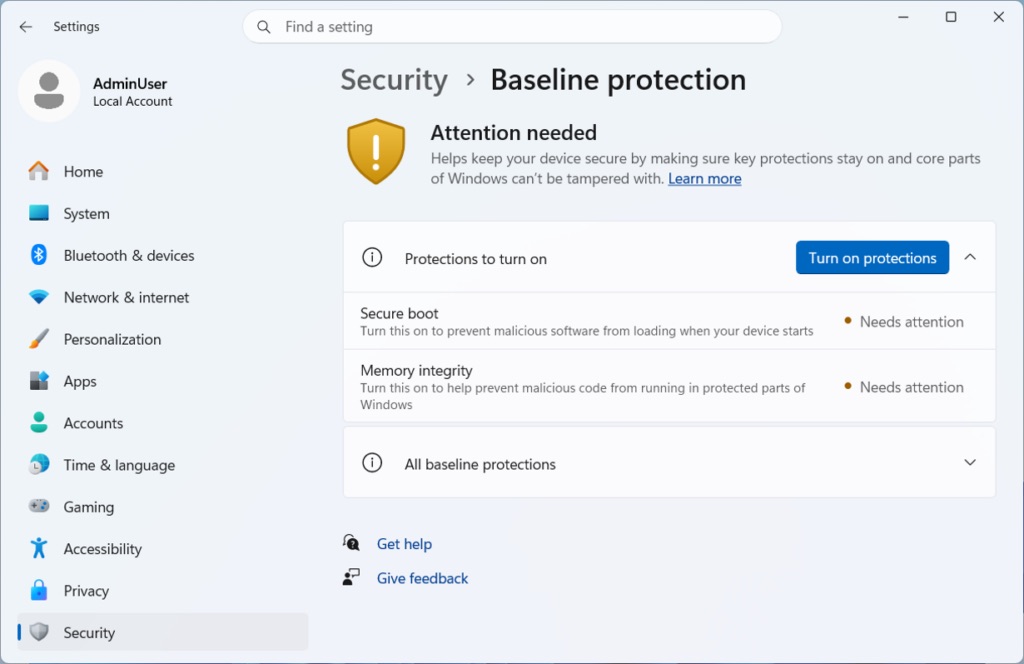
Microsoft unveiled a new Windows 11 security feature called Baseline Protection at Ignite 2026 on November 17, rolling eight existing hardware and software protections into a single, versioned security state that apps can check before deciding whether to run. The feature is now in preview through the Windows Insider Program, with general availability planned for 2027.
The first version checks the security processor (TPM), Secure Boot, virtualization-based security, memory integrity, driver-signing requirements, Windows-certified driver compliance, kernel-debugger protection, and vulnerable-driver blocking. Windows measures these at boot time using the security processor and exposes the result through an API that developers can query, either as a simple pass/fail, a list of missing protections, or a hardware-backed attestation token the app's own servers can verify independently.
Crucially, Microsoft isn't dictating what happens when a PC fails the check — that decision belongs entirely to the app developer. Dana Huang, Corporate Vice President of Windows Security, described Baseline Protection as giving apps «a single, versioned security state,» while Brandon Bray, Principal Group Product Manager for Windows, put the division of responsibility plainly: «the platform reports the state; you own the policy.» A failing PC could see nothing more than a warning, lose access to a specific feature, or be blocked from running the app entirely, depending entirely on what the developer chooses to build.
Early partners testing the API include Adobe, Blizzard's Battle.net client, password manager 1Password, and Schoolyear, an exam-security platform. None of the four companies has announced plans to actually block PCs that fail the check — so far, the integrations remain exploratory. Schoolyear's lead security engineer, Gergely Homonnai, described a concrete use case: confirming a student's computer meets security requirements before letting them start a proctored exam.
On consumer PCs, the feature surfaces in Settings > Security > Baseline Protection, showing a green shield when all eight checks pass or an «Attention needed» warning with a one-click «Turn on protections» option when they don't. Enabling Secure Boot specifically requires a trip into UEFI firmware settings, so Windows walks users through that step with an on-screen QR code. Enterprise administrators get a parallel view through Baseline Security Mode in the Microsoft 365 admin center, currently set to «reporting only» rather than enforcement.
The feature raises an obvious concern for a subset of power users: anyone who has deliberately disabled Secure Boot to dual-boot Linux, or turned off memory integrity because it conflicts with specific drivers or anti-cheat software, will show up as failing the baseline by design — even though the modification was intentional rather than a security lapse. Whether app developers choose to distinguish between those cases and genuinely unprotected machines will depend entirely on how each company implements its own policy on top of Microsoft's reporting layer.
As announced by Microsoft at Ignite 2026, via the Windows Experience blog, November 17, 2026.
Originally reported by Microsoft (Windows Experience Blog). Read the original article for additional details.
View original source