Der Product Concept Visualizer: Verwandeln Sie jede Idee mit einem einzigen Prompt in ein fotorealistisches Mockup
Warum dieser Prompt wichtig ist
Most product ideas never get visualized because hiring a designer takes days and costs money. This prompt gives founders, product managers, and indie makers a way to render any product concept in seconds — good enough for investor decks, landing pages, and user testing before a single dollar is spent on production.
Wofür wir ihn verwenden
Generate photorealistic product concept images for pitches, portfolios, and prototyping — no designer or studio required.
Prompt
Create a photorealistic product concept image of [PRODUCT NAME]: [2-sentence description of what it is and what it does]. Show it as a polished commercial product — [MATERIAL/FINISH] casing, [COLOR SCHEME] color palette, on [BACKGROUND: white studio / lifestyle setting / dark premium]. Include [KEY FEATURE: a display, a button arrangement, a logo area, a charging port, etc.]. Style: product photography, 50mm lens, soft studio lighting, slight shadow underneath. High detail, commercial-ready.
Ergebnis
The Prompt Formula
Copy this template and fill in the brackets for any product you want to visualize:
Create a photorealistic product concept image of [PRODUCT NAME]: [2-sentence description of what it is and what it does]. Show it as a polished commercial product — [MATERIAL/FINISH] casing, [COLOR SCHEME] color palette, on [BACKGROUND: white studio / lifestyle setting / dark premium]. Include [KEY FEATURE: a display, a button arrangement, a logo area, a charging port, etc.]. Style: product photography, 50mm lens, soft studio lighting, slight shadow underneath. High detail, commercial-ready.Example Output
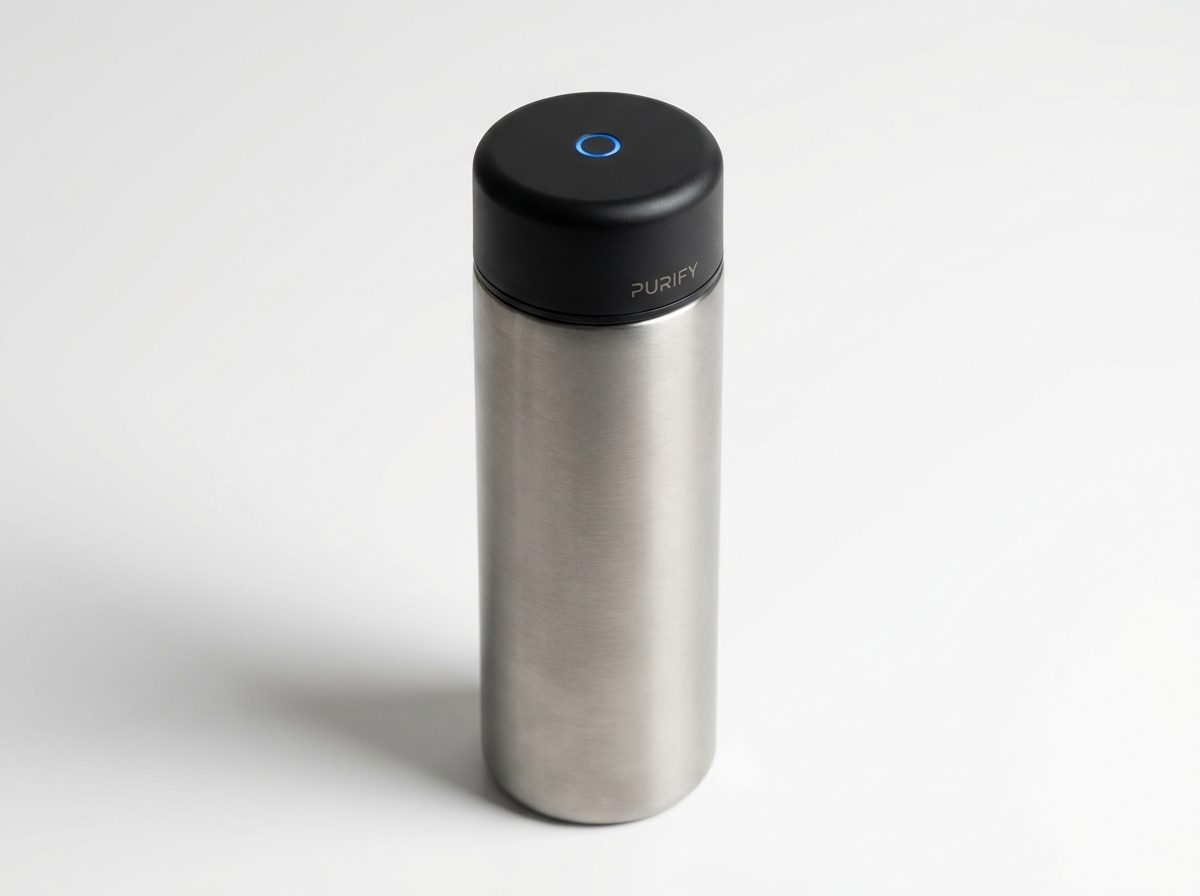
Here is what the formula produces for a smart water bottle concept:
"Create a photorealistic product concept image of a smart water bottle with a built-in UV-C purifier cap: a sleek cylindrical bottle that sterilizes water using ultraviolet light in the cap. Show it as a polished commercial product — brushed titanium and matte black finish, on a white studio background. Include a small circular UV LED indicator glowing blue on the cap and a minimal branding area. Style: product photography, 50mm lens, soft studio lighting, slight shadow underneath. High detail, commercial-ready."
The result (shown above) is a render indistinguishable from a professional product photographer's work — generated in under 30 seconds.
How to Customize It
The four variables that most affect the output quality are:
- Material + finish — be specific: "anodized aluminum", "soft-touch matte plastic", "brushed stainless steel with a glossy glass face". Vague materials produce vague renders.
- Background — "white studio" gives the cleanest e-commerce look. "Lifestyle" (e.g., "sitting on a kitchen counter") adds context. "Dark premium" suggests luxury pricing.
- Key feature callout — name the one visual element that makes the product recognizable. For a fitness tracker: "an always-on AMOLED display showing a heart rate graph". For a speaker: "a circular grille with a glowing ring LED".
- Color palette — give it a name or a hex code. "Forest green and brushed copper", "Space gray", "#1A1A2E dark navy with gold trim" all produce distinct and consistent results.
Practical Use Cases
- Investor decks — visualize a product before prototyping to test whether the concept reads well on a slide
- Landing pages — collect emails or pre-orders for a product that doesn't exist yet
- User research — show multiple visual variants to early users and measure which resonates before committing to a design
- App store assets — generate hero images for software products shown inside a device frame
- Social media — product teasers for launches or announcements without a physical sample
Which Models Work Best
This prompt works across all major image generators, but the output style varies:
- DALL-E 3 / GPT Image — cleanest white-background studio shots, best for e-commerce style
- Midjourney v7 — highest photorealism for lifestyle and premium dark backgrounds
- Flux Pro 1.1 — fastest iteration, good for testing color variants quickly
- Stable Diffusion / ComfyUI — most customizable if you want consistent brand colors across multiple renders
Start with whichever model you already use. The formula works with all of them — the variable that matters most is how specific your description is, not which model runs it.
One More Tip
Add "—no text, no labels" at the end if you don't want the model to hallucinate product names or fictional branding on the product surface. Most models will leave text off by default, but this instruction makes it explicit.
Generiertes Bild
Die Prompt-Formel
Kopiere diese Vorlage und fülle die Klammern für jedes Produkt aus, das du visualisieren möchtest:
Create a photorealistic product concept image of [PRODUCT NAME]: [2-sentence description of what it is and what it does]. Show it as a polished commercial product — [MATERIAL/FINISH] casing, [COLOR SCHEME] color palette, on [BACKGROUND: white studio / lifestyle setting / dark premium]. Include [KEY FEATURE: a display, a button arrangement, a logo area, a charging port, etc.]. Style: product photography, 50mm lens, soft studio lighting, slight shadow underneath. High detail, commercial-ready.Beispielausgabe
Hier siehst du, was die Formel für ein Smart-Water-Bottle-Konzept erzeugt:
"Create a photorealistic product concept image of a smart water bottle with a built-in UV-C purifier cap: a sleek cylindrical bottle that sterilizes water using ultraviolet light in the cap. Show it as a polished commercial product — brushed titanium and matte black finish, on a white studio background. Include a small circular UV LED indicator glowing blue on the cap and a minimal branding area. Style: product photography, 50mm lens, soft studio lighting, slight shadow underneath. High detail, commercial-ready."
Das Ergebnis (oben gezeigt) ist ein Render, das sich nicht von der Arbeit eines professionellen Produktfotografen unterscheiden lässt – generiert in unter 30 Sekunden.
So passt du es an
Die vier Variablen, die die Ausgabequalität am stärksten beeinflussen, sind:
- Material + Finish – sei spezifisch: „eloxiertes Aluminium“, „Soft-Touch-Mattkunststoff“, „gebürsteter Edelstahl mit glänzender Glasfront“. Vage Materialangaben führen zu vagen Renderings.
- Hintergrund – „White Studio“ gibt den saubersten E-Commerce-Look. „Lifestyle“ (z. B. „auf einer Küchentheke“) fügt Kontext hinzu. „Dark Premium“ suggeriert Luxuspreise.
- Key-Feature-Callout – nenne das eine visuelle Element, das das Produkt erkennbar macht. Für einen Fitness-Tracker: „ein Always-On-AMOLED-Display, das ein Herzfrequenzdiagramm anzeigt“. Für einen Lautsprecher: „ein kreisförmiges Gitter mit einer leuchtenden Ring-LED“.
- Farbpalette – gib ihr einen Namen oder einen Hexcode. „Waldgrün und gebürstetes Kupfer“, „Space Gray“, „#1A1A2E Dunkles Marineblau mit Goldverzierung“ – all das liefert unterschiedliche und konsistente Ergebnisse.
Praktische Anwendungsfälle
- Investor Decks – visualisiere ein Produkt vor dem Prototyping, um zu testen, ob das Konzept auf einer Folie gut rüberkommt
- Landing Pages – sammle E-Mails oder Vorbestellungen für ein Produkt, das es noch nicht gibt
- User Research – zeige frühen Nutzern mehrere visuelle Varianten und messe, welche ankommt, bevor du dich auf ein Design festlegst
- App-Store-Assets – generiere Hero-Bilder für Softwareprodukte, die in einem Geräterahmen gezeigt werden
- Social Media – Produkt-Teaser für Launchs oder Ankündigungen ohne physisches Muster
Welche Modelle funktionieren am besten
Dieser Prompt funktioniert mit allen großen Bildgeneratoren, aber der Output-Stil variiert:
- DALL-E 3 / GPT Image – sauberste White-Background-Studioaufnahmen, am besten für E-Commerce-Style
- Midjourney v7 – höchster Fotorealismus für Lifestyle und Premium-Dark-Hintergründe
- Flux Pro 1.1 – schnellste Iteration, gut zum schnellen Testen von Farbvarianten
- Stable Diffusion / ComfyUI – am anpassbarsten, wenn du konsistente Markenfarben über mehrere Renderings hinweg haben möchtest
Beginne mit dem Modell, das du bereits verwendest. Die Formel funktioniert mit allen – die wichtigste Variable ist, wie spezifisch deine Beschreibung ist, nicht welches Modell sie ausführt.
Noch ein Tipp
Füge am Ende „—no text, no labels“ hinzu, wenn du nicht möchtest, dass das Modell Produktnamen oder fiktives Branding auf der Produktoberfläche halluziniert. Die meisten Modelle lassen Text standardmäßig weg, aber diese Anweisung macht es explizit.