<p>أداة تحويل فكرة المنتج إلى نموذج أولي واقعي للغاية باستخدام تعليمة Prompt واحدة فقط</p>
لماذا تهم هذه المطالبة
Most product ideas never get visualized because hiring a designer takes days and costs money. This prompt gives founders, product managers, and indie makers a way to render any product concept in seconds — good enough for investor decks, landing pages, and user testing before a single dollar is spent on production.
فيم نستخدمها
Generate photorealistic product concept images for pitches, portfolios, and prototyping — no designer or studio required.
المطالبة
Create a photorealistic product concept image of [PRODUCT NAME]: [2-sentence description of what it is and what it does]. Show it as a polished commercial product — [MATERIAL/FINISH] casing, [COLOR SCHEME] color palette, on [BACKGROUND: white studio / lifestyle setting / dark premium]. Include [KEY FEATURE: a display, a button arrangement, a logo area, a charging port, etc.]. Style: product photography, 50mm lens, soft studio lighting, slight shadow underneath. High detail, commercial-ready.
النتيجة
The Prompt Formula
Copy this template and fill in the brackets for any product you want to visualize:
Create a photorealistic product concept image of [PRODUCT NAME]: [2-sentence description of what it is and what it does]. Show it as a polished commercial product — [MATERIAL/FINISH] casing, [COLOR SCHEME] color palette, on [BACKGROUND: white studio / lifestyle setting / dark premium]. Include [KEY FEATURE: a display, a button arrangement, a logo area, a charging port, etc.]. Style: product photography, 50mm lens, soft studio lighting, slight shadow underneath. High detail, commercial-ready.Example Output
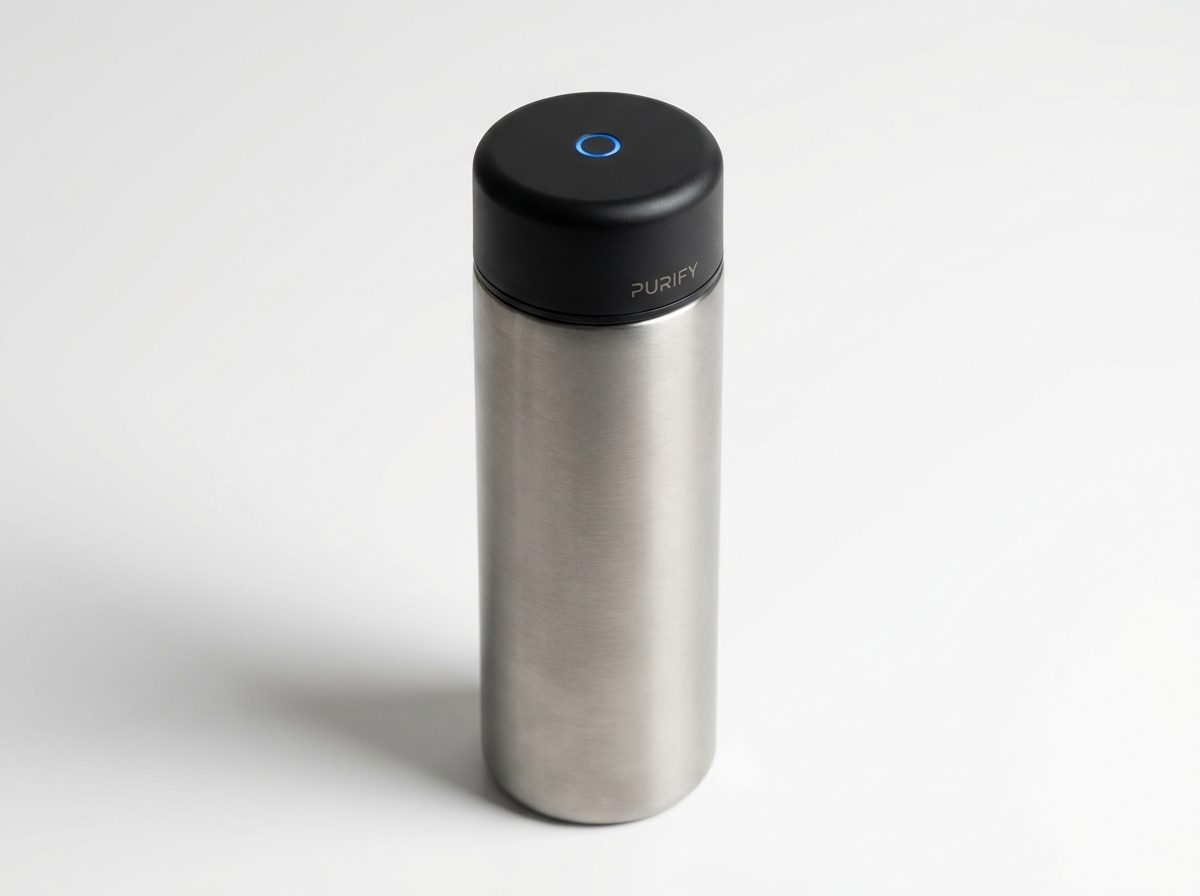
Here is what the formula produces for a smart water bottle concept:
"Create a photorealistic product concept image of a smart water bottle with a built-in UV-C purifier cap: a sleek cylindrical bottle that sterilizes water using ultraviolet light in the cap. Show it as a polished commercial product — brushed titanium and matte black finish, on a white studio background. Include a small circular UV LED indicator glowing blue on the cap and a minimal branding area. Style: product photography, 50mm lens, soft studio lighting, slight shadow underneath. High detail, commercial-ready."
The result (shown above) is a render indistinguishable from a professional product photographer's work — generated in under 30 seconds.
How to Customize It
The four variables that most affect the output quality are:
- Material + finish — be specific: "anodized aluminum", "soft-touch matte plastic", "brushed stainless steel with a glossy glass face". Vague materials produce vague renders.
- Background — "white studio" gives the cleanest e-commerce look. "Lifestyle" (e.g., "sitting on a kitchen counter") adds context. "Dark premium" suggests luxury pricing.
- Key feature callout — name the one visual element that makes the product recognizable. For a fitness tracker: "an always-on AMOLED display showing a heart rate graph". For a speaker: "a circular grille with a glowing ring LED".
- Color palette — give it a name or a hex code. "Forest green and brushed copper", "Space gray", "#1A1A2E dark navy with gold trim" all produce distinct and consistent results.
Practical Use Cases
- Investor decks — visualize a product before prototyping to test whether the concept reads well on a slide
- Landing pages — collect emails or pre-orders for a product that doesn't exist yet
- User research — show multiple visual variants to early users and measure which resonates before committing to a design
- App store assets — generate hero images for software products shown inside a device frame
- Social media — product teasers for launches or announcements without a physical sample
Which Models Work Best
This prompt works across all major image generators, but the output style varies:
- DALL-E 3 / GPT Image — cleanest white-background studio shots, best for e-commerce style
- Midjourney v7 — highest photorealism for lifestyle and premium dark backgrounds
- Flux Pro 1.1 — fastest iteration, good for testing color variants quickly
- Stable Diffusion / ComfyUI — most customizable if you want consistent brand colors across multiple renders
Start with whichever model you already use. The formula works with all of them — the variable that matters most is how specific your description is, not which model runs it.
One More Tip
Add "—no text, no labels" at the end if you don't want the model to hallucinate product names or fictional branding on the product surface. Most models will leave text off by default, but this instruction makes it explicit.
صورة مُولّدة
صيغة الـ Prompt
انسخ هذا النموذج واملأ الأقواس لأي منتج تريد تصويره:
أنشئ صورة مفهوم منتج فوتوريلستية (واقعية فائقة) لـ [اسم المنتج]: [وصف من جملتين لما هو عليه وماذا يفعل]. اعرضه كمنتج تجاري مصقول — غلاف [المادة/اللمسة النهائية]، لوحة ألوان [نظام الألوان]، على خلفية [خلفية: استوديو أبيض / سياق حياتي / داكن فاخر]. تضمين [الميزة الرئيسية: شاشة عرض، ترتيب أزرار، منطقة شعار، منفذ شحن، إلخ]. الأسلوب: تصوير منتجات، عدسة 50 مم، إضاءة استوديو ناعمة، ظل خفيف بالأسفل. تفاصيل عالية، جاهز تجاريًا.مثال على المخرجات
إليك ما تنتجه الصيغة لتصور زجاجة ماء ذكية:
«أنشئ صورة مفهوم منتج فوتوريلستية لزجاجة ماء ذكية بغطاء مزود بأشعة UV-C للتعقيم: زجاجة أسطوانية أنيقة تقوم بتعقيم الماء باستخدام الضوء فوق البنفسجي داخل الغطاء. اعرضها كمنتج تجاري مصقول — هيكل من التيتانيوم المصقول وأسود غير لامع، على خلفية استوديو بيضاء. تضمين مؤشر LED دائري صغير بلون أزرق متوهج على الغطاء ومنطقة للعلامة التجارية بأقل قدر من العناصر. الأسلوب: تصوير منتجات، عدسة 50 مم، إضاءة استوديو ناعمة، ظل خفيف بالأسفل. تفاصيل عالية، جاهز تجاريًا.»
النتيجة (الموضحة أعلاه) هي صورة مخرَجة لا يمكن تمييزها عن عمل مصور منتجات محترف — تم إنشاؤها في أقل من 30 ثانية.
كيفية تخصيصها
المتغيرات الأربعة الأكثر تأثيراً على جودة المخرجات هي:
- المادة + اللمسة النهائية — كن محددًا: "ألومنيوم مؤكسد"، "بلاستيك غير لامع ناعم الملمس"، "فولاذ مقاوم للصدأ مصقول مع وجه زجاجي لامع". المواد الغامضة تنتج صورًا مخرَجة غامضة.
- الخلفية — "استوديو أبيض" يعطي أنقى مظهر للتجارة الإلكترونية. "سياق حياتي" (مثل "موضوعة على طاولة مطبخ") يضيف سياقًا. "داكن فاخر" يوحي بأسعار مرتفعة.
- تحديد الميزة الرئيسية — اذكر العنصر البصري الوحيد الذي يجعل المنتج مميزًا. لجهاز تتبع اللياقة: "شاشة AMOLED دائمة التشغيل تعرض رسمًا بيانيًا لمعدل ضربات القلب". لمكبر صوت: "شبكة دائرية مع حلقة LED متوهجة".
- لوحة الألوان — أعطها اسمًا أو كود hex. "أخضر غابي ونحاس مصقول"، "رمادي فضائي"، "#1A1A2E أزرق داكن مع حواف ذهبية" — جميعها تنتج نتائج مميزة ومتناسقة.
حالات استخدام عملية
- عروض تقديمية للمستثمرين — تصور منتجًا قبل بناء النموذج الأولي لاختبار مدى وضوح الفكرة على الشريحة.
- صفحات هبوط — جمع عناوين البريد الإلكتروني أو طلبات ما قبل البيع لمنتج لم يُصنع بعد.
- أبحاث المستخدمين — عرض عدة متغيرات بصرية على المستخدمين الأوائل وقياس أيها يلقى صدى قبل الالتزام بتصميم معين.
- مواد متجر التطبيقات — إنشاء صور رئيسية لمنتجات برمجية معروضة داخل إطار جهاز.
- وسائل التواصل الاجتماعي — تشويقات للمنتجات عند الإطلاق أو الإعلانات بدون وجود عينة مادية.
أي النماذج تعمل بشكل أفضل
تعمل هذه الصيغة مع جميع مولدات الصور الرئيسية، لكن أسلوب المخرجات يختلف:
- DALL-E 3 / GPT Image — أنقى اللقطات بخلفية بيضاء، الأفضل لأسلوب التجارة الإلكترونية.
- Midjourney v7 — أعلى مستوى من الواقعية الفوتوغرافية للخلفيات الحياتية والداكنة الفاخرة.
- Flux Pro 1.1 — أسرع تكرار، جيد لاختبار متغيرات الألوان بسرعة.
- Stable Diffusion / ComfyUI — الأكثر قابلية للتخصيص إذا كنت تريد ألوان علامة تجارية متناسقة عبر عدة صور مخرَجة.
ابدأ بأي نموذج تستخدمه بالفعل. الصيغة تعمل مع جميعها — المتغير الأكثر أهمية هو مدى دقة وصفك، وليس النموذج الذي ينفذه.
نصيحة إضافية
أضف "—no text, no labels" في النهاية إذا كنت لا تريد أن يخترع النموذج أسماء منتجات أو علامات تجارية وهمية على سطح المنتج. معظم النماذج تتجاهل النص افتراضيًا، لكن هذا التوجيه يجعله صريحًا.